Thursday, November 12, 2015
SAS on Jupyter
I strongly prefer to do all my coding from within Jupyter notebooks, but that's not really possible when everyone else uses SAS (well, in Accounting). So I threw together a really simple SAS kernel for Jupyter, which is hosted on github (gaulinmp/sas_kernel). It'd definitely a work in progress, right now it doesn't even strip line numbers. But my free time is limited, what with dissertating and all. While I'm at it, I'll also plug my SEC EDGAR python library, which I use a lot these days.

Tuesday, May 20, 2014
Helpful SAS UI/usage tips
TL;DR: http://support.sas.com/resources/papers/proceedings12/151-2012.pdf
After a long time reading and too little time in Python, I'm back to SAS. My setup involves sshing into a linux server and using SAS over X11 because I like to look at tables. I know there is SAS interactive mode, but I'm a Luddite or don't want to incur the learning costs.
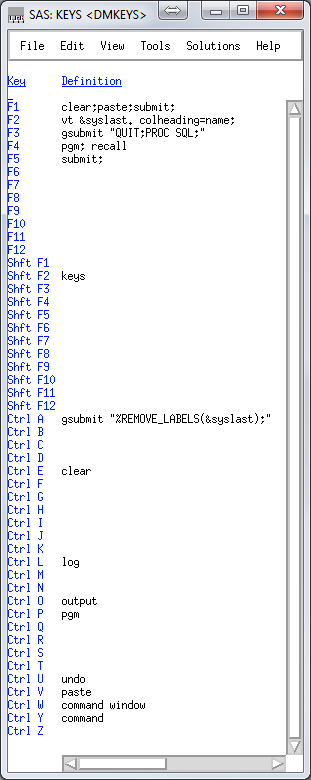 Right now my keys file looks like this:
clear;paste;submit; is what I use most often. I program in SublimeText3, and copy sections of code, alt-tab over and hit F1.
vt &syslast. colheading=name; uses the VIEWTABLE (vt) command to open a table for viewing, and &syslast is an automatic variable that stores the last edited table. This is a 'what did I just make' button.
gsubmit "QUIT;PROC SQL;" is convenient because I do almost everything in PROC SQL, which I like to just leave running. But when I jump out quickly, this gets me back in so I don't have to copy and paste the proc start command.
gsubmit "%REMOVE_LABELS(&syslast);" runs a macro that removes the labels from the last file edited. This is not really that important, I just don't like labels in my datasets.
The REMOVE_LABELS macro can be found in my MACROS.SAS gist.
Also to automatically display variable names in the column headings of tables, see here.
After a long time reading and too little time in Python, I'm back to SAS. My setup involves sshing into a linux server and using SAS over X11 because I like to look at tables. I know there is SAS interactive mode, but I'm a Luddite or don't want to incur the learning costs.
Right now my keys file looks like this:clear;paste;submit; is what I use most often. I program in SublimeText3, and copy sections of code, alt-tab over and hit F1.
vt &syslast. colheading=name; uses the VIEWTABLE (vt) command to open a table for viewing, and &syslast is an automatic variable that stores the last edited table. This is a 'what did I just make' button.
gsubmit "QUIT;PROC SQL;" is convenient because I do almost everything in PROC SQL, which I like to just leave running. But when I jump out quickly, this gets me back in so I don't have to copy and paste the proc start command.
gsubmit "%REMOVE_LABELS(&syslast);" runs a macro that removes the labels from the last file edited. This is not really that important, I just don't like labels in my datasets.
The REMOVE_LABELS macro can be found in my MACROS.SAS gist.
Also to automatically display variable names in the column headings of tables, see here.
Tuesday, September 3, 2013
STATA Quote Madness
So I was trying to make pretty LaTeX tables in Stata using esttab, but I happen to be using a program that just outputs scalars. Here's the program in a nutshell:
In case that wasn't clear, the operable line to get those labels working was:
local mrownames: display `"`mrownames'"' " " `"`"`gtitle'"'"'
Come on STATA... seriously? I think this is the logic:
1) local mrownames: display
Of course we can't assign it directly, you gotta format it. This is probably my ignorance, I'm sure there's a better way.
2) `"`mrownames'"' " " `"`"`gtitle'"'"'
Make sure the variable between these keeps its quotes.
3) `"`mrownames'"' " " `"`"`gtitle'"'"'
5) `"`mrownames'"' " " `"`"`gtitle'"'"'
7) `"`mrownames'"' " " `"`"`gtitle'"'"'
foreach var of varlist at lt invt ppent sale re xrd ta dv {
local gtitle = "Total Assets"
if "`var'" == "lt" {
local gtitle = "Total Liabilities"
}/* List the rest of the titles */
discont `var' port // This is my program that returns scalars.
matrix tmpmat_`var' = r(leftpred), r(rightpred), ///
r(d), r(zstat), r(pstat)
/* You have to initialize the matrix, of course. */
if "`var'" == "at" {
matrix tmpmat_all = tmpmat_`var'
}
else { /* But then the format is pretty friendly */
matrix tmpmat_all = (tmpmat_all \ tmpmat_`var')
}
/* Now how to get those title names into the matrix rows? */
local mrownames: display `"`mrownames'"' " " `"`"`gtitle'"'"'
} /* Done with the foreach*/
matrix colnames tmpmat_all = E[Left] E[Right] Difference Z-stat P-stat
matrix rownames tmpmat_all = `mrownames'
esttab matrix(tmpmat_all), nomtitles
esttab matrix(tmpmat_all) using table.tex, nomtitles replace
In case that wasn't clear, the operable line to get those labels working was:
local mrownames: display `"`mrownames'"' " " `"`"`gtitle'"'"'
Come on STATA... seriously? I think this is the logic:
1) local mrownames: display
Of course we can't assign it directly, you gotta format it. This is probably my ignorance, I'm sure there's a better way.
2) `"`mrownames'"' " " `"`"`gtitle'"'"'
Make sure the variable between these keeps its quotes.
3) `"`mrownames'"' " " `"`"`gtitle'"'"'
The list so far. In quotes remember.
4) `"`mrownames'"' " " `"`"`gtitle'"'"'
Make sure to leave a space between your quoted strings.
The new title variable, so good so far.
6) `"`mrownames'"' " " `"`"`gtitle'"'"'
It's gotta be in quotes, of course.
Because you are up late and deserve to be punished. How long did it take you to figure this one out? Yeah, you could have been sleeping already if this were Python.
I really don't like STATA.
Sunday, November 18, 2012
Persistant Default Library
I've been switching back and forth between libraries I define and the work library, mostly because I don't like putting "mylib." in front of every library name. But today I learned that if you define the USER library, it will use that as a permanent work library. So for example the following code:
libname USER "D:/SAS/project1";Will create example_database.sas7db in the D:/SAS/project1 folder, and when you reboot SAS and run the libname user command again (or better yet, put it in your autoexec.sas file), all your work files will be there waiting. It's a time saver if you are working on a project and have to shutdown SAS.
DATA example_database;
SET other_database_in_D_SAS_project1;
RUN;
Friday, March 16, 2012
Data Step Array (Macro) Variables
I want some thing simple. I have a data file with many fields with sequential names, and I want to reorganize them. It's all dead simple regex logic: var12 becomes var2 in row 1, var22 becomes var2 in row 2. Two minutes in python. In SAS...
So here's my method of making an Array Macro Variable (nothing native to the best of my knowledge) on which I will then use numbered indexes to massage the table later:
The output of that is the following
Oh yeah, that happened. SAS guessed the length of name for the loop at 4 characters, then truncated velociraptor.
The solution was to use the length name $12:
So here's my method of making an Array Macro Variable (nothing native to the best of my knowledge) on which I will then use numbered indexes to massage the table later:
data _null_;
i = 1;
DO name = "bear","pig","velociraptor";
ii = left(put(i,2.));
call symput('variable_name'||ii,name);
i+1;
put name;
END;
The output of that is the following
bear
pic
velo
Oh yeah, that happened. SAS guessed the length of name for the loop at 4 characters, then truncated velociraptor.
The solution was to use the length name $12:
data _null_;
i = 1;
length name $12;
DO name = "bear","pig","velociraptor";
ii = left(put(i,2.));
call symput('variable_name'||ii,name);
i+1;
put name;
END;
Monday, March 12, 2012
Cleaning SDC Downloaded Data
I wrote some python code to simply clean up SDC downloaded fixed width data. It uses easygui, a python library to give it a little GUI interface, and I'll be the first to admit it's pretty crappy. But it works and made my life easier, so I'll share.
Google Doc Link
Google Doc Link
Sunday, March 11, 2012
Compustat Codes and Field (Variable) Names
Maybe this is common knowledge, but this page made life infinitely easier to replicate old papers:
Now all I need is free time to turn that into a tool for automatic SQL query generation.
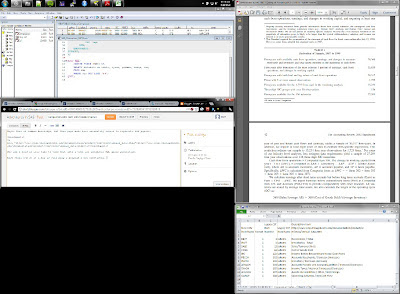
Also while I'm at it I may as well plug a program I use constantly. WinSplit Revolution allows you to resize windows with key commands (I use control alt numpad). So setting up my desktop to look like below takes a few keyboard presses. If you use multiple monitors it's a life saver. Because sharing is caring.
http://www.crsp.chicagobooth.edu/documentation/product/ccm/cross/annual_data.html
Now all I need is free time to turn that into a tool for automatic SQL query generation.
Also while I'm at it I may as well plug a program I use constantly. WinSplit Revolution allows you to resize windows with key commands (I use control alt numpad). So setting up my desktop to look like below takes a few keyboard presses. If you use multiple monitors it's a life saver. Because sharing is caring.

Subscribe to:
Posts (Atom)