I like open source. Specifically, I like github. Mostly because if something annoys me in code, I can fork, change, then pull from my branch in the future (how I handle TQDM). Or clone, update locally, and pull changes, dealing with conflicts in the future (how I handle oh-my-zsh). Either way, I can make my changes persist somehow.
The reason I bring this up, is because I wanted to test my code against the RDPlot package. I threw my data at it and it worked just fine, until I tried to do area confidence limits. Because the RDPlot code uses xline, Stata lays that down as part of the axis, which the area plot then covers. So there's no vertical line at the RD cutoff in the middle of the graph. This will just not do. So I opened the code, and added the following (on line 646 if you're interested, changes bolded). Now it looks as I desire, but I can't make this persist across updates. Nor can I submit a bug report or a pull request. If only it were on github :(. C'est la vie, it works for now.
quietly sum cir_bin, d
local plot_y_max = r(max)
quietly sum cil_bin, d
local plot_y_min = r(min)
twoway (rarea cil_bin cir_bin meanx_bin, sort color(gs11)) ///
(scatter meany_bin meanx_bin, sort msize(small) mcolor(gs10)) ///
(line y_hat x_sup if x_sup<`c', lcolor(black) sort lwidth(medthin) lpattern(solid)) /// (line y_hat x_sup if x_sup>=`c', lcolor(black) sort lwidth(medthin) lpattern(solid)) ///
(pci `plot_y_max' `c' `plot_y_min' `c', lcolor(black) lwidth(medthin) legend(off)), ///
xline(`c', lcolor(black) lwidth(medthin)) xscale(r(`x_min' `x_max')) legend(cols(2) order(2 "Sample average within bin" 3 "Polynomial fit of order `p'" )) `graph_options'
Thursday, November 3, 2016

Thursday, June 9, 2016
Ipython parallel local vs. engine execution
TL;DR: using a lambda in the map on a ipyparallel View will obviate loading the function locally.
I've always used %%px --local to do parallel processing in Python. But recently I wanted to throw all my code in a python file, then just have a short notebook that essentially just kicked off the processes and wrote the results to disk. So I tried this:
I've always used %%px --local to do parallel processing in Python. But recently I wanted to throw all my code in a python file, then just have a short notebook that essentially just kicked off the processes and wrote the results to disk. So I tried this:
#In [1]:However this doesn't work. The reason is the IP_view.map; it's looking for analyze_multiple_ciks locally, which we haven't loaded. So wrapping that function to defer its referencing seems to work:
from ipyparallel import Client
IP_client = Client()
IP_view = IP_client.load_balanced_view()
# In [2]:
%%px
import sys
sys.path.append('.../code/')
from myresearch import analyze_multiple_ciks
#In [3]:
N = len(IP_client.ids) # or larger for load balancing
_gs = [df[(df.cik > (_d.cik.quantile(i/N) if i else 0))
&(df.cik <= df.cik.quantile((i+1)/N))]
for i in range(N)]
#In [4]:
res = IP_view.map(analyze_multiple_ciks, _gs)
#In [4]:Perhaps this was obvious, but I couldn't find much online about it. Also I do the chunking manually in In[3] because I've found using ipython to queue 23,000 tasks is really slow. So I wrap my code in an 'analyze_multiple' function and reduce the queue length considerably. Maybe that's not still a problem in the updated ipyparallel, but it's how I've always done it.
res = IP_view.map(lambda x: analyze_multiple_ciks(x), _gs)
Tuesday, April 5, 2016
Clustered Standard Errors in Statsmodel OLS
I am using Statsmodel instead of STATA where possible, and wanted to cluster standard errors by firm. The problem I encountered was I use Patsy to create the endog/exog matrices, and statsmodel requires the cluster group Series to match length. (Aside: There's an open Github issue about this.) I'm sure there are more clever solutions, but mine was to give Patsy a dataframe with no missing data. The statsmodels documentation was a bit unclear, so I figured I'd share the working snippet below.
# Selection criteria
select_df = (df[(df['at']>1) & (df['ff12']!=8)]
.sort_values('cik y_q'.split()))
# Columns that appear in regressions, as well as group variable
cols = 'cik cp ni_at re_at xrd_at at y_q ff12'.split()
# Final dataframe with no missing data.
# This gets the patsy arrays and group series to have the same length.
reg_df = select_df.ix[select_df[cols].notnull().all(axis=1), cols]
mod = sm.OLS.from_formula('cp ~ ni_at + re_at + xrd_at + np.log(at)'
'+ C(y_q) + C(ff12)', reg_df)
res = mod.fit(cov_type='cluster', cov_kwds={'groups': reg_df['cik']})
# output results without F.E. dummies
print("\n".join([x for x in str(res.summary()).split('\n')
if 'C(' not in x]))
Tuesday, February 16, 2016
Fama French Industries
I'm back in Python and needing to get FF12 from sic codes. So I wrote a little script to download the definitions from French's website and make a Pandas DataFrame that allows for merging. Thought I would share:
Edit: An alternative is to use pandas_datareader.famafrench
Edit: An alternative is to use pandas_datareader.famafrench
Monday, February 1, 2016
SAS on XUbuntu
For a long time I only had SAS running in -nodms mode on the latest XUbuntu, my desktop's OS. Today I finally figured it out, and wanted to share just in case anyone else has had this problem.
First off, I'm running Xubuntu Wily (15.10), and SAS 9.4. The installation didn't work in graphical mode, because when I sudo su sas, then ./sasdm.sh, it complains: Can't connect to X11 window server using ':0' as the value of the DISPLAY variable. Whatever, ./sasdm.sh -console works. Anyway, the first problem when launching SAS is that it complained about the SASHELP Portable Registry being corrupted. Turns out it didn't exist at all. So I had to copy regstry.sas7bitm from a working version of SAS 9.3 (yeah, it worked across versions somehow) to my local sascfg directory (/opt/SASHome/SASFoundation/9.4/nls/en/sascfg/). Once that was there, I started getting errors about missing libraries. First libXp.so.6, which doesn't exist on the Wily repo any more, and must be downloaded from the Vivid repo here:
http://packages.ubuntu.com/vivid/amd64/libxp6/download
And secondly libjpeg.so.62, which can be installed with sudo apt-get install libjpeg62-dev libjpeg62. Finally once that was done, SAS loaded in dms mode. It also now runs in X11 mode forwarded over ssh now too.
First off, I'm running Xubuntu Wily (15.10), and SAS 9.4. The installation didn't work in graphical mode, because when I sudo su sas, then ./sasdm.sh, it complains: Can't connect to X11 window server using ':0' as the value of the DISPLAY variable. Whatever, ./sasdm.sh -console works. Anyway, the first problem when launching SAS is that it complained about the SASHELP Portable Registry being corrupted. Turns out it didn't exist at all. So I had to copy regstry.sas7bitm from a working version of SAS 9.3 (yeah, it worked across versions somehow) to my local sascfg directory (/opt/SASHome/SASFoundation/9.4/nls/en/sascfg/). Once that was there, I started getting errors about missing libraries. First libXp.so.6, which doesn't exist on the Wily repo any more, and must be downloaded from the Vivid repo here:
http://packages.ubuntu.com/vivid/amd64/libxp6/download
And secondly libjpeg.so.62, which can be installed with sudo apt-get install libjpeg62-dev libjpeg62. Finally once that was done, SAS loaded in dms mode. It also now runs in X11 mode forwarded over ssh now too.
Thursday, November 12, 2015
SAS on Jupyter
I strongly prefer to do all my coding from within Jupyter notebooks, but that's not really possible when everyone else uses SAS (well, in Accounting). So I threw together a really simple SAS kernel for Jupyter, which is hosted on github (gaulinmp/sas_kernel). It'd definitely a work in progress, right now it doesn't even strip line numbers. But my free time is limited, what with dissertating and all. While I'm at it, I'll also plug my SEC EDGAR python library, which I use a lot these days.
Tuesday, May 20, 2014
Helpful SAS UI/usage tips
TL;DR: http://support.sas.com/resources/papers/proceedings12/151-2012.pdf
After a long time reading and too little time in Python, I'm back to SAS. My setup involves sshing into a linux server and using SAS over X11 because I like to look at tables. I know there is SAS interactive mode, but I'm a Luddite or don't want to incur the learning costs.
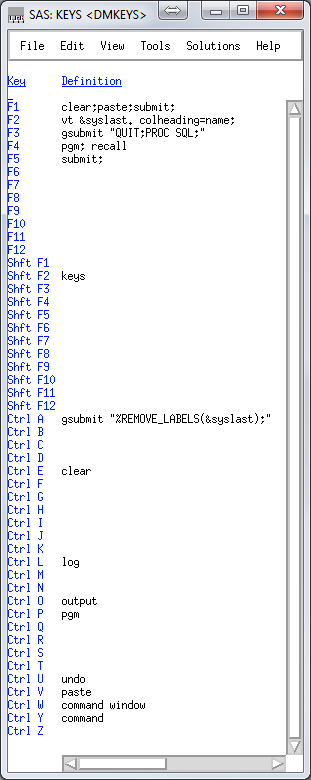 Right now my keys file looks like this:
clear;paste;submit; is what I use most often. I program in SublimeText3, and copy sections of code, alt-tab over and hit F1.
vt &syslast. colheading=name; uses the VIEWTABLE (vt) command to open a table for viewing, and &syslast is an automatic variable that stores the last edited table. This is a 'what did I just make' button.
gsubmit "QUIT;PROC SQL;" is convenient because I do almost everything in PROC SQL, which I like to just leave running. But when I jump out quickly, this gets me back in so I don't have to copy and paste the proc start command.
gsubmit "%REMOVE_LABELS(&syslast);" runs a macro that removes the labels from the last file edited. This is not really that important, I just don't like labels in my datasets.
The REMOVE_LABELS macro can be found in my MACROS.SAS gist.
Also to automatically display variable names in the column headings of tables, see here.
After a long time reading and too little time in Python, I'm back to SAS. My setup involves sshing into a linux server and using SAS over X11 because I like to look at tables. I know there is SAS interactive mode, but I'm a Luddite or don't want to incur the learning costs.
Right now my keys file looks like this:clear;paste;submit; is what I use most often. I program in SublimeText3, and copy sections of code, alt-tab over and hit F1.
vt &syslast. colheading=name; uses the VIEWTABLE (vt) command to open a table for viewing, and &syslast is an automatic variable that stores the last edited table. This is a 'what did I just make' button.
gsubmit "QUIT;PROC SQL;" is convenient because I do almost everything in PROC SQL, which I like to just leave running. But when I jump out quickly, this gets me back in so I don't have to copy and paste the proc start command.
gsubmit "%REMOVE_LABELS(&syslast);" runs a macro that removes the labels from the last file edited. This is not really that important, I just don't like labels in my datasets.
The REMOVE_LABELS macro can be found in my MACROS.SAS gist.
Also to automatically display variable names in the column headings of tables, see here.
Tuesday, September 3, 2013
STATA Quote Madness
So I was trying to make pretty LaTeX tables in Stata using esttab, but I happen to be using a program that just outputs scalars. Here's the program in a nutshell:
In case that wasn't clear, the operable line to get those labels working was:
local mrownames: display `"`mrownames'"' " " `"`"`gtitle'"'"'
Come on STATA... seriously? I think this is the logic:
1) local mrownames: display
Of course we can't assign it directly, you gotta format it. This is probably my ignorance, I'm sure there's a better way.
2) `"`mrownames'"' " " `"`"`gtitle'"'"'
Make sure the variable between these keeps its quotes.
3) `"`mrownames'"' " " `"`"`gtitle'"'"'
5) `"`mrownames'"' " " `"`"`gtitle'"'"'
7) `"`mrownames'"' " " `"`"`gtitle'"'"'
foreach var of varlist at lt invt ppent sale re xrd ta dv {
local gtitle = "Total Assets"
if "`var'" == "lt" {
local gtitle = "Total Liabilities"
}/* List the rest of the titles */
discont `var' port // This is my program that returns scalars.
matrix tmpmat_`var' = r(leftpred), r(rightpred), ///
r(d), r(zstat), r(pstat)
/* You have to initialize the matrix, of course. */
if "`var'" == "at" {
matrix tmpmat_all = tmpmat_`var'
}
else { /* But then the format is pretty friendly */
matrix tmpmat_all = (tmpmat_all \ tmpmat_`var')
}
/* Now how to get those title names into the matrix rows? */
local mrownames: display `"`mrownames'"' " " `"`"`gtitle'"'"'
} /* Done with the foreach*/
matrix colnames tmpmat_all = E[Left] E[Right] Difference Z-stat P-stat
matrix rownames tmpmat_all = `mrownames'
esttab matrix(tmpmat_all), nomtitles
esttab matrix(tmpmat_all) using table.tex, nomtitles replace
In case that wasn't clear, the operable line to get those labels working was:
local mrownames: display `"`mrownames'"' " " `"`"`gtitle'"'"'
Come on STATA... seriously? I think this is the logic:
1) local mrownames: display
Of course we can't assign it directly, you gotta format it. This is probably my ignorance, I'm sure there's a better way.
2) `"`mrownames'"' " " `"`"`gtitle'"'"'
Make sure the variable between these keeps its quotes.
3) `"`mrownames'"' " " `"`"`gtitle'"'"'
The list so far. In quotes remember.
4) `"`mrownames'"' " " `"`"`gtitle'"'"'
Make sure to leave a space between your quoted strings.
The new title variable, so good so far.
6) `"`mrownames'"' " " `"`"`gtitle'"'"'
It's gotta be in quotes, of course.
Because you are up late and deserve to be punished. How long did it take you to figure this one out? Yeah, you could have been sleeping already if this were Python.
I really don't like STATA.
Sunday, November 18, 2012
Persistant Default Library
I've been switching back and forth between libraries I define and the work library, mostly because I don't like putting "mylib." in front of every library name. But today I learned that if you define the USER library, it will use that as a permanent work library. So for example the following code:
libname USER "D:/SAS/project1";Will create example_database.sas7db in the D:/SAS/project1 folder, and when you reboot SAS and run the libname user command again (or better yet, put it in your autoexec.sas file), all your work files will be there waiting. It's a time saver if you are working on a project and have to shutdown SAS.
DATA example_database;
SET other_database_in_D_SAS_project1;
RUN;
Friday, March 16, 2012
Data Step Array (Macro) Variables
I want some thing simple. I have a data file with many fields with sequential names, and I want to reorganize them. It's all dead simple regex logic: var12 becomes var2 in row 1, var22 becomes var2 in row 2. Two minutes in python. In SAS...
So here's my method of making an Array Macro Variable (nothing native to the best of my knowledge) on which I will then use numbered indexes to massage the table later:
The output of that is the following
Oh yeah, that happened. SAS guessed the length of name for the loop at 4 characters, then truncated velociraptor.
The solution was to use the length name $12:
So here's my method of making an Array Macro Variable (nothing native to the best of my knowledge) on which I will then use numbered indexes to massage the table later:
data _null_;
i = 1;
DO name = "bear","pig","velociraptor";
ii = left(put(i,2.));
call symput('variable_name'||ii,name);
i+1;
put name;
END;
The output of that is the following
bear
pic
velo
Oh yeah, that happened. SAS guessed the length of name for the loop at 4 characters, then truncated velociraptor.
The solution was to use the length name $12:
data _null_;
i = 1;
length name $12;
DO name = "bear","pig","velociraptor";
ii = left(put(i,2.));
call symput('variable_name'||ii,name);
i+1;
put name;
END;
Monday, March 12, 2012
Cleaning SDC Downloaded Data
I wrote some python code to simply clean up SDC downloaded fixed width data. It uses easygui, a python library to give it a little GUI interface, and I'll be the first to admit it's pretty crappy. But it works and made my life easier, so I'll share.
Google Doc Link
Google Doc Link
Sunday, March 11, 2012
Compustat Codes and Field (Variable) Names
Maybe this is common knowledge, but this page made life infinitely easier to replicate old papers:
Now all I need is free time to turn that into a tool for automatic SQL query generation.
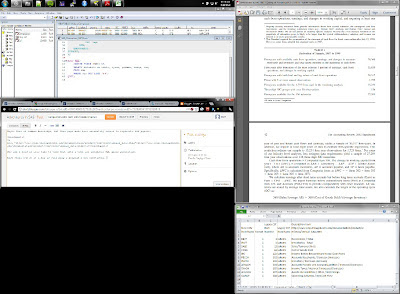
Also while I'm at it I may as well plug a program I use constantly. WinSplit Revolution allows you to resize windows with key commands (I use control alt numpad). So setting up my desktop to look like below takes a few keyboard presses. If you use multiple monitors it's a life saver. Because sharing is caring.
http://www.crsp.chicagobooth.edu/documentation/product/ccm/cross/annual_data.html
Now all I need is free time to turn that into a tool for automatic SQL query generation.
Also while I'm at it I may as well plug a program I use constantly. WinSplit Revolution allows you to resize windows with key commands (I use control alt numpad). So setting up my desktop to look like below takes a few keyboard presses. If you use multiple monitors it's a life saver. Because sharing is caring.

Friday, March 9, 2012
Searching Google Scholar
I've been doing non-SAS research, and got tired of messing around with Google Scholar searches, so I made the following chrome search tag:

http://scholar.google.com/scholar?&num=100&as_subj=bus&as_q=%sThat searches within Business and Finance journals only which is quite convenient in my opinion. To add to Chrome (similar in firefox), go to the URL in the following screen shot and enter the URL quoted above where it says. I put the letter s for the keyword, so now when I want to do a google scholar search I type CNTRL-L, then type s and hit space. Anything typed after the space will be the search term.

Tuesday, February 28, 2012
Remove Overlapping Windows
A little bit of SAS code to remove dates that overlap by some amount (defined in a Macro Variable). Example from an event study with dates from SDC.
First off sort the data, removing any duplicates. In this case duplicates is determined just by the variables sorted on, so permco, permno, and date. This removes the problem of having more than one event on the same day.
Create a temporary table with lag and difference fields. The lag field is more for debugging as the difference field is all we care about. If the event is the first event for the company, leave the fields blank.
Create the output table and only keep events where the event date is either blank (first event) or if the time between events is greater than the window.
------ Code ------
mydata: the library where my crsp and cleaned sdc files are
sdc_permno: database with SDC data and permno's instead of cusips (already linked SDC and CRSP)
sdc_final: the output sdc data file with the event dates (non overlapping) and permnos
&beta_pre_length: The macro variable with the length of my pre window for calculating the betas in the market return model
&study_start_date: The macro bariable with the start date
First off sort the data, removing any duplicates. In this case duplicates is determined just by the variables sorted on, so permco, permno, and date. This removes the problem of having more than one event on the same day.
Create a temporary table with lag and difference fields. The lag field is more for debugging as the difference field is all we care about. If the event is the first event for the company, leave the fields blank.
Create the output table and only keep events where the event date is either blank (first event) or if the time between events is greater than the window.
mydata: the library where my crsp and cleaned sdc files are
sdc_permno: database with SDC data and permno's instead of cusips (already linked SDC and CRSP)
sdc_final: the output sdc data file with the event dates (non overlapping) and permnos
&beta_pre_length: The macro variable with the length of my pre window for calculating the betas in the market return model
&study_start_date: The macro bariable with the start date
/* SDC_FINAL: Clean up data and remove all SEOs with another SEO within window_prev before. */
PROC SORT DATA=mydata.sdc_permno OUT=tmp_sdc_permno NODUPKEY;
BY permco permno fdate;
RUN;
DATA tmp_sdc_lag;
SET tmp_sdc_permno;
BY permco permno fdate idate shares shares_p shares_s;
lag_date = LAG(fdate);
dif_date = DIF(fdate);
IF FIRST.permco THEN DO;
lag_date = .;
dif_date = .;
END;
RUN;
PROC SQL;
CREATE TABLE mydata.sdc_final AS
SELECT monotonic() as count, permno, fdate, shares, shares_p, shares_s
FROM tmp_sdc_lag
WHERE fdate > &study_start_date and (dif_date EQ . OR dif_date > &beta_pre_len)
;
DROP TABLE tmp_sdc_lag;
DROP TABLE tmp_sdc_permno;
QUIT;
Monday, February 27, 2012
sas7bndx: Story of SAS Indexes
Last night I ran code to extract companies from the CRSP Daily Stock file. It ran all night and was going to take 8 more hours today. This is unacceptable. The fix was relatively simple, here's how it came about.
First I got the file original CRSP datafile (2 hour download):
But extracting permnos from that file took 1 minute for each PROC SQL statement. Everyone said something was wrong, no one had ideas what. So I poked around a WRDS ssh session and noticed all these .sas7bndx files. NDX sounds like index I cleverly thought to myself, maybe SAS has an index file to make looking up permnos faster! Lo and behold, it does. So then I ran this code:
And now my PROC SQL queries execute in milliseconds. Day seized.
First I got the file original CRSP datafile (2 hour download):
libname mydata = "D:\SAS";
%let wrds=wrds.wharton.upenn.edu 4016;
options comamid=TCP remote=WRDS;
signon username=&username password=&password;
rsubmit;
libname crspa '/wrds/crsp/sasdata/a_stock';
PROC DOWNLOAD DATA= crspa.dsf
OUT=mydata.crsp_dsf;
WHERE date > '01JAN1995'd;
RUN;
endrsubmit;
signoff;
But extracting permnos from that file took 1 minute for each PROC SQL statement. Everyone said something was wrong, no one had ideas what. So I poked around a WRDS ssh session and noticed all these .sas7bndx files. NDX sounds like index I cleverly thought to myself, maybe SAS has an index file to make looking up permnos faster! Lo and behold, it does. So then I ran this code:
PROC DATASETS LIBRARY=mydata;
MODIFY crsp_dsf;
INDEX CREATE permno;
RUN;
And now my PROC SQL queries execute in milliseconds. Day seized.
PROC SQL Dates and Macro Variables
Here's a little quiz: What is the name of a 'column' in a database?
I digress. Here's what I learned. The following code:
So the solution? Everything is text. That's my new mantra. Obviously the solution is to use the following code:
So the moral of this story is make everything a string. Always. Also use date9 in PROC SQL. And '&eventdate' doesn't work, only double quotes evaluates the macro variable. Ugh, macro variable angers me.
a) columnIf you answered D, go to wikipedia and find 'variable' on the SQL page. Go, I'll wait. So after wasting hours searching for variables, I learn that SAS calls columns variables, and the things that represent numbers for flexibility (in algebra you call them variables) are MACRO variables. Good luck googling help for macro variables and avoiding all the pages that discuss both database variables and macros.
b) field
c) anything but
d) variable
I digress. Here's what I learned. The following code:
PROC SQL NOPRINT;Will return null. Oh the data is in there, if you replace &eventdate; by '01JAN2001'd you will get data. But SAS can't pull a date from one table and use it in the WHERE query in another table. MACRO VARIABLES just don't work that way. Duh.
SELECT permno,fdate format=mmddyy10.
INTO :permnovar, :eventdate
FROM libstore.sdc_events
WHERE count = &i;
SELECT *
FROM libstore.crsp_dsf
WHERE date = &eventdate;
QUIT;
So the solution? Everything is text. That's my new mantra. Obviously the solution is to use the following code:
PROC SQL NOPRINT;The other thing to note is that mmddyy10 is NOT the format to use. Even though it comes out of SDC like that, and CRSP uses something else, PROC SQL uses date9 in its comparison. In fact '01/01/2000'd throws an error in PROC SQL. Don't ask, just accept it.
SELECT permno,fdate format=date9.
INTO :permnovar, :eventdate
FROM libstore.sdc_events
WHERE count = &i;
QUIT;
%let eventdate_cleaned = "&eventdate"d;
PROC SQL NOPRINT;
SELECT *
FROM libstore.crsp_dsf
WHERE date = &eventdate_cleaned;
QUIT;
So the moral of this story is make everything a string. Always. Also use date9 in PROC SQL. And '&eventdate' doesn't work, only double quotes evaluates the macro variable. Ugh, macro variable angers me.
Subscribe to:
Posts (Atom)